Offline POS Systems: Why Your Restaurant Can't Afford to Depend on the Internet
On a Thursday afternoon in September 2023, Square pushed a routine software update. Within minutes, hundreds of thousands of restaurants across the country went dark. Orders stopped. Kitchens went silent. At Saint Francis Apizza in New Haven, the owner watched $651 in sales and $90 in tips evaporate over the next 24 hours. Folklores Coffee House in San Antonio closed early. Hundreds of other businesses scrambled for pen and paper.
One software update. One cloud dependency. Countless restaurants left unable to do business.
If you run a restaurant, you already know that your POS going down during service is not a minor inconvenience. It is a crisis. And if your POS depends on a cloud server to function, that crisis is one ISP hiccup away.
This guide breaks down how an offline POS system actually works, what most vendors mean when they say "offline mode" (spoiler: it is less than you think), and why a growing number of operators are demanding a POS system that works without an internet connection. By the end, you will know exactly what to ask your POS provider and what to look for in a system that keeps selling no matter what happens to your uplink.
What is an offline POS system?
An offline POS system is a point-of-sale system that can process transactions, manage orders, and run core business operations without an active internet connection. Unlike cloud-based POS systems that require constant connectivity, an offline POS system stores data locally on the device and continues functioning during network outages.
But not all offline POS systems are created equal. Most vendors offer a limited "POS offline mode" that acts as a temporary fallback. A true offline POS system, sometimes called an offline-first or local-first POS, treats the device as the primary system and the internet as optional. That distinction makes all the difference when your restaurant is full and the internet goes down.
The real cost of POS downtime
The numbers are worse than most operators realize.
A restaurant doing $30 average order value with 50 orders per hour loses $1,500 for every hour the POS is down. At 99% uptime, that is still roughly 58 hours of annual downtime, translating to over $12,000 in direct lost revenue per year. And that is before you count comped meals, frustrated customers who never come back, and stressed staff trying to work around a broken system.
The problem is getting worse, not better. A 2025 survey by Digi International found that 84% of businesses report rising network outages over the past two years. More than a third reported losses between $1 million and $5 million from outages in the past year alone.
And here is the detail that makes "just go cash-only" a non-starter: credit cards now account for 40% of in-store transactions, while cash accounts for only 11%. Going cash-only during an outage means losing access to roughly 89% of your potential transactions.
POS downtime is not an IT problem. It is a revenue problem.
Thinking about how your current POS handles outages? See how POSAIC compares to Square, Toast, and Clover in a side-by-side breakdown.
What "offline mode" actually means (and what it doesn't)
Most major POS vendors advertise some form of offline capability. But the details matter far more than the marketing.
When Square, Toast, Shopify, or Lightspeed say "offline mode," they mean a limited fallback state, a degraded version of normal operations designed to bridge a short connectivity gap. Here is what that actually looks like in practice:
Square allows offline card payments on all hardware, but caps it at 24 hours from the first offline transaction. No gift cards. No Afterpay. No manual card entry. And the kicker: if a card is declined when the connection comes back, the merchant absorbs the loss. (For a deeper comparison, see our POSAIC vs Square 2026 breakdown.)
Toast auto-activates offline after 40 seconds without internet. Their "Local Sync" mode uses a hub device on the LAN to distribute orders between terminals. Offline payments work for cash and card, but loyalty programs, gift cards, and text-to-pay all go dark.
Shopify POS can process cash and card payments offline, but with a critical warning buried in their documentation: do not turn off the device or sign out, or you lose all offline orders. There is no cross-location inventory sync until you reconnect, which means overselling is a real risk.
Lightspeed enters offline mode after two minutes without internet, but only the Smart Terminal supports offline payments. You cannot search products or customers by name. Only barcode scanning, SKU entry, and quick keys work.
These are not true offline POS systems. These are cloud POS systems with an emergency fallback, sometimes called a hybrid POS approach. The store-and-forward method they use, where transactions queue locally and upload on reconnect, works for brief outages. But it was never designed for POS resilience during extended downtime or multi-device coordination without a server.
The limitations that matter during a rush
During a busy Friday night, "offline mode" typically means:
- No real-time kitchen display updates (on many systems)
- No split payments or complex payment workflows
- No customer loyalty lookups
- No cross-device inventory awareness
- Transaction caps and time limits on card processing
- Risk of declined payments hitting the merchant's pocket
For a quiet Tuesday afternoon, that might be tolerable. For a packed house doing 200 covers? That is a business-critical failure.
Offline mode vs. offline-first: the architecture that changes everything
Here is where the conversation shifts from features to architecture, and it is the distinction that most POS comparison articles completely miss.
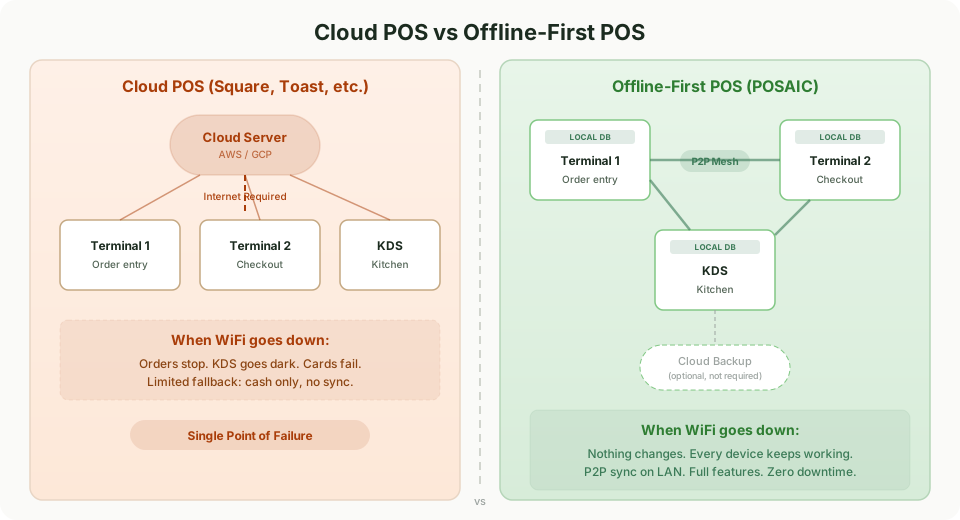
Offline mode means the system was designed for the cloud and has a fallback for when the cloud is unavailable. The cloud is primary. The device is secondary. When connectivity drops, features degrade.
Offline-first means the system was designed to work on the device from the start. Every order processes locally. Every business rule executes locally. Every event is recorded locally. The cloud, or any network connection, is a sync layer, not a dependency. (Card authorization is the one exception — that always depends on your payment processor's offline mode, an industry-wide constraint we cover below.)
Think of it this way: a cloud POS with offline mode is like a car that can coast downhill when the engine dies. An offline-first POS is like an electric vehicle with a full battery. The engine was never the bottleneck.
Consider what happened to Marco, a franchise operator running six fast-casual locations across northern New Jersey. Two of his restaurants sit in strip malls with notoriously unreliable internet. With his previous cloud POS, those locations would lose connectivity two or three times a week during peak hours. Each outage meant 15 to 30 minutes of cash-only transactions, confused staff, and missing order data that had to be manually reconciled later. After switching to an offline-first system, those locations stopped losing orders entirely. The connectivity issues did not go away; they just stopped mattering.
That is the difference architecture makes.
How offline-first POS systems actually work
A true offline-first POS system uses several architectural patterns working together. Understanding these helps you evaluate whether a vendor's offline POS claims are genuine.
Local-first data storage
Every order, from line items to payment intent, writes directly to an encrypted local database on the device. There is no round trip to a cloud server for the POS layer. The device does not need permission to operate.
This means your terminal can create orders, apply discounts, process cash and pre-authorized card payments, send tickets to the kitchen, update inventory, and generate reports, all without any network connection at all.
Event Sourcing for data integrity
Instead of storing just the current state of an order (which can be overwritten or corrupted), an offline-first POS records every change as an immutable event:
- Order created
- Item added
- Discount applied
- Payment received
- Order completed
Each event is timestamped and permanent. You cannot lose data because there is nothing to overwrite. When it comes time for end-of-day settlement, you have a complete, tamper-proof record of every transaction. This event sourcing POS approach means that for operators who have ever had to reconcile missing orders or explain discrepancies to franchise HQ, the audit trail is built into the architecture itself.
Learn more about why your POS data should stay on your device and what local-first data storage means for your business.
P2P mesh sync (no server required)
Here is where offline-first systems diverge most sharply from traditional POS architecture.
A cloud POS syncs every terminal through a central server. If that server (or your internet connection to it) goes down, every terminal loses sync. Toast's "Local Sync" improves on this by designating one device as a local hub, but that hub is still a single point of failure.
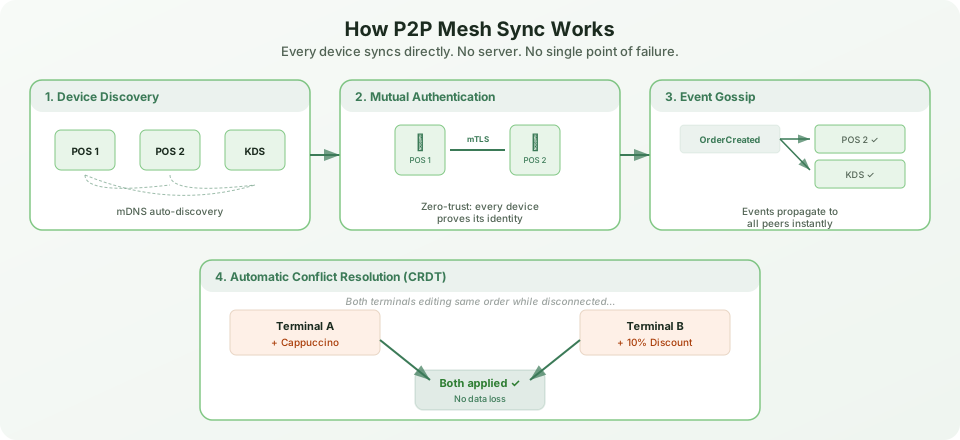
A P2P mesh approach eliminates the single point of failure entirely. Every device discovers and communicates directly with every other device on the local network. When your server takes an order on a tablet, the kitchen display sees it instantly, not because both devices talked to a cloud server, but because the tablet sent the event directly to every peer on the mesh.
No server room. No dedicated POS server. No single device that can take down your whole operation.
Automatic conflict resolution
The question operators always ask about offline systems: "What happens when two terminals modify the same order while disconnected?"
With a cloud POS, the answer is usually "last write wins," which means one set of changes gets silently discarded. With an offline-first system using Conflict-free Replicated Data Types (CRDTs), both sets of changes merge automatically.
Terminal A adds a cappuccino to an order. Terminal B applies a 10% loyalty discount to the same order. When the terminals reconnect, both changes apply. No data loss. No manual intervention. No "which version do you want to keep?" popup at the worst possible moment.
Want to see this in action? Explore the POSAIC POS application to see how P2P mesh sync and conflict resolution work in a real multi-terminal setup.
Vendor offline comparison: what you can and can't do
Here is a direct comparison of what major POS systems actually support when the internet goes down:
| Capability | Square | Toast | Shopify | Lightspeed | Offline-First POS |
|---|---|---|---|---|---|
| Cash payments | Yes | Yes | Yes | Yes | Yes |
| Card payments | Yes (24hr limit) | Yes | Yes (some readers) | Smart Terminal only | Yes (no time limit) |
| Kitchen display sync | No | Local Sync only | No | No | Yes (P2P mesh) |
| Split payments | No | Limited | No | No | Yes |
| Customer/loyalty lookup | No | No | No | No | Yes (local data) |
| Inventory sync | No | No | No | No | Yes (P2P mesh) |
| Multi-terminal sync | No | Hub device only | No | No | Yes (P2P mesh) |
| Product search | Limited | Yes | Limited | Barcode/SKU only | Yes (full) |
| Reporting | No | Limited | No | No | Yes (local) |
| Time limit | 24 hours | None stated | Until restart | None stated | None |
| Declined card risk | Merchant absorbs | Merchant absorbs | Merchant absorbs | Merchant absorbs | Depends on adapter |
The pattern is clear. Traditional POS offline mode strips away most of the features that matter during a busy service. A true offline POS system preserves them because the features were never dependent on a cloud connection to begin with.
Five questions to ask before choosing an offline POS system
If you are evaluating an offline POS system and reliability matters to your operation, these five questions will separate genuine offline support from marketing claims.
1. How much can I transact while offline?
Ask about dollar caps per transaction, cumulative limits, and time restrictions. If the answer includes phrases like "24-hour window" or "configurable maximum," you are looking at a fallback, not a foundation.
2. What happens when an offline card payment is declined on reconnect?
This is the question most operators forget to ask. With most cloud POS systems, if a card is declined when the system comes back online, the merchant eats the loss. Ask who bears the financial risk.
3. What features are disabled in offline mode?
Request a complete list, not a summary. Kitchen display sync, customer lookup, split payments, inventory tracking, and reporting are the features that matter most during a rush. If they go dark offline, your "offline mode" is mostly decorative.
4. How do multiple terminals stay in sync without internet?
This is the architectural question. If the answer is "they don't," or "one device acts as a hub," you have a single point of failure. Ask whether terminals can communicate directly with each other.
5. What happens if I lose power or a device crashes while offline?
Data durability matters. Ask whether offline transactions are persisted to disk immediately or held in memory. If a device crashes mid-service and offline data is lost, the offline mode created a worse problem than the outage it was supposed to solve.
Why an offline POS system is the future of restaurant technology
The restaurant industry is in the middle of a significant technology shift. The global POS market reached $38.56 billion in 2025 and is projected to hit $44.6 billion in 2026. More than half of restaurant operators plan to upgrade or replace their POS systems this year.
What are they looking for? Reliability tops the list. The IFBTA's 2026 white paper on restaurant POS explicitly names "offline uninterruptable operations" as a key demanded feature. After years of cloud-dependent systems failing during the moments that matter most, operators are voting with their wallets.
The trajectory is clear: the industry is moving from cloud-dependent to edge-first. The POS systems that will win in 2026 and beyond are the ones that treat the local device as the primary system and the network as a convenience, not a requirement.
POSAIC was built on this exact principle. Every order starts and completes on-device. Devices on the same local network sync directly with each other over a P2P mesh. Every state change is recorded as an immutable event with a complete audit trail. The architecture does not have an "offline mode" because it was never designed to depend on being online. Card authorization is handled by your processor's offline mode (Stripe Terminal or Square) — the same way every POS in the industry handles it.
Set up your first offline POS system in under 30 minutes with our step-by-step guide.
Frequently asked questions about offline POS systems
Can you run a POS system without internet?
Yes. A properly designed offline POS system processes orders, applies business rules, and records transactions entirely on the local device. POS without internet is not only possible, it is the foundation of local-first architecture. The key distinction is whether offline is a fallback mode or the default operating state.
What happens to transactions when the internet goes down?
It depends on your system. With most cloud POS platforms, you enter a degraded offline mode with limited features and time caps. With an offline-first POS system, nothing changes because the device was already processing locally. Transactions continue normally, and data syncs automatically when connectivity returns.
Is an offline POS system secure?
An offline POS system can be more secure than a cloud-dependent one. With data stored locally in an AES-256 encrypted database (POSAIC uses SQLCipher) and peer-to-peer communication scoped to your local network, there is no central cloud server to breach. Security through local control, not cloud trust.
What POS system works best for restaurants with unreliable internet?
Restaurants with unreliable internet need a POS system that works without an internet connection as its default state, not as an emergency fallback. Look for offline-first architecture with P2P device sync over the local network, local data storage, and no time limits on offline operation.
Your POS should work as hard as you do
Here is what it comes down to: your restaurant does not stop serving food when the internet drops. Your offline POS system should not either.
"Offline mode" as the industry defines it today is a band-aid on an architectural problem. It gives you just enough functionality to survive a short outage, but it strips away the features your staff actually need when the restaurant is busy and the pressure is highest.
Offline-first is a different answer to the same question. Instead of asking "what can we preserve when the cloud goes away?" it starts with "what if the cloud was never required?"
Three things to take away from this guide:
- POS downtime costs real money: $1,500 per hour or more during peak service, and outages are increasing
- Most "offline mode" implementations are time-limited, feature-restricted fallbacks that leave you exposed during the moments that matter most
- Offline-first architecture, where every device operates independently and syncs via P2P mesh, eliminates the single point of failure entirely
If your current POS treats the internet as infrastructure, it is time to reconsider. Your restaurant deserves a system that keeps running through internet outages, never loses an order, and runs on the devices you already have.
Download POSAIC free and see what offline-first feels like in practice. No per-terminal fees. No cloud dependency. No excuses.
Ready to switch?
POSAIC is free, works offline, and keeps your data on your device.